
Ok so you’ve launched your website, the next step is to make your presence known on the web. Sometimes this means paying to be seen, so it’s only natural you would like to find out what works and how people land on your site. At Found, as part of our FoundLabs project, we have created a Contact Form Analytics plugin so you will never have to wonder how people have found you again!
What is it?
Contact Form Analytics is a simple but clever piece of software that collects information from your Google Analytics’ cookies and adds it to the emails sent after forms are filled on your site. This provides insight into what brought visitors to your website, such as a PPC or mobile marketing campaign. As a pre-requisite, you need to have Google Analytics code installed on your website in order for the plugin to run.
Why use it?
If you’re using Google Analytics goal tracking to record contact form submissions, you can simply see how many leads each source generates. However, since Google doesn’t collect identifiable information about users, you can’t tell which leads came from which source. With this plugin, you can get a much better picture of where your most valuable leads are coming from, and therefore optimise your online marketing channels more effectively. We’ve developed plugins for two content management systems popular with our clients, WordPress and Magento.
WP version – Contact Form 7 Analytics Plugin for WordPress
As the title suggests, this plugin is an addition to the popular WordPress plugin Contact Form 7 .
How the plugin works
I love the flexibility of the CF7 plugin and the fact that it comes with an API. This made it possible to implement an elegant solution for our Analytics addition in the form of a [found] shortcode to your contact form builder (by using the hooks made available by CF7).
By using the shortcode, key information from Google Analytics will be included in the email that the form submission generates. The implementation is seamless – users used to using CF7 shortcodes to generate their form fields will find the [found] shortcode familiar and easy to use.
How to install it
- Download and extract Contact Form 7 Analytics from Found zip file to the plugins folder.
- Verify that you see the contact-form-7-found folder inside the plugins folder.
- Activate it through the plugin management screen.
- A new shortcode([found]) will be available in the Contact Form 7 builder interface.
- Add the shortcode to your form and to the emails you set up for your site.
The Magento Extension – Contact Form Analytics for Magneto
Recognising that traffic source and PPC insight are very valuable to merchants, a version of the plugin for the most popular ecommerce platform seemed like the next logical step. The Magento extension simply extends the contact form functionality and appends the analytics code to the email message. The analytics code is generated by the module’s model, which makes it flexible in the sense that it can be called anywhere in the application. Installation is easy via Magento Connect and it only requires the plugin to be activated – no other configuration required.
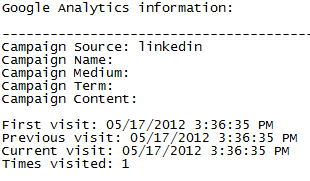
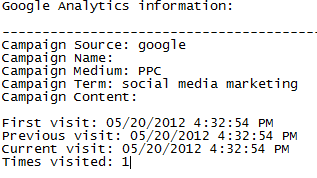
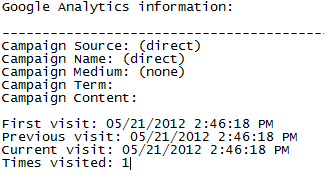
Source field values explained:
- Empty (and all other fields empty) – the visitor has disabled cookies or GA code is not installed
- Direct – the visitor has come directly to your site by either using a bookmark or they remembered your URL. They did use a search engine or used a link via another referrer.
- Google – the user has used Google’s search engine to land on your site. If the medium value is PPC then the user clicked on a premium ad. If the medium value is organic then they clicked on a link of one of the organic listings.
- Another website’s name (Ex: ‘facebook’) – the visitor has landed on your site by clicking a link on another website.
Below are a few examples:
Roadmap – what is next step for the plugins?
As the EU cookie law implementation deadline is approaching we are looking into alternatives to using cookies, so we keep providing the same useful information to the site owners, even if their visitors decide not to accept cookies. For the Magento version, we’re looking into incorporating Analytics into the main conversion point of the site – order confirmations.
We hope you find the plugins useful and enjoy the insight it provides. We would love to hear your feedback so please let us know about your experience or if you come across any issues.
As a FoundLabs project, the plugin follows the ethos of our labs department – create software that is helpful and relevant for our business, test it, use it and then open source it.